
Introduction – Why Misconceptions Are More Dangerous Than Malware
The most dangerous security gap is not always malware. Often, it is the belief that basic tools, strong passwords, or one annual training session are enough. In 2026, cybersecurity myths can lead to delayed action, weak controls, and avoidable loss. To protect businesses from cyber threats, leaders must replace cybersecurity misconceptions with a responsible plan.
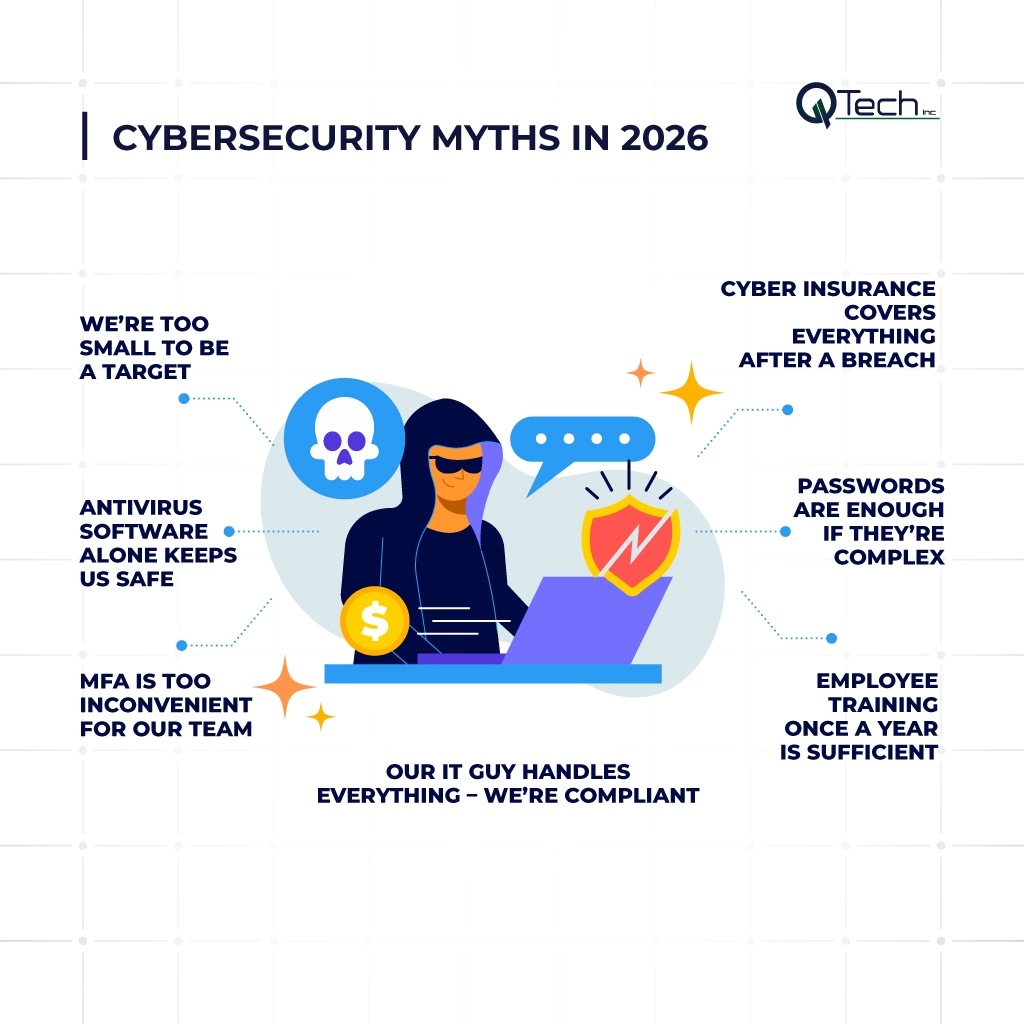
Cybersecurity Myths In 2026
- Myth #1: We’re Too Small to Be a Target
- Myth #2: Antivirus Software Alone Keeps Us Safe
- Myth #3: MFA Is Too Inconvenient for Our Team
- Myth #4: Our IT Guy Handles Everything – We’re Compliant
- Myth #5: Cyber Insurance Covers Everything After a Breach
- Myth #6: Passwords Are Enough If They’re Complex
- Myth #7: Employee Training Once a Year Is Sufficient
Myth #1: “We’re Too Small to Be a Target”
Small business owners often assume attackers only chase large enterprises. That assumption is one of the most common business security mistakes because criminals look for easy entry, not famous logos.
The reality: 43% of cyberattacks target small businesses
The U.S. Small Business Administration notes that 43% of cyberattacks are aimed at small businesses. This means a local office, clinic, school, retailer, or professional firm can face the same risk as a larger brand.
Why SMBs are prime targets (easier entry, big impact)
Attackers know many SMBs have limited staff, older tools, weak access control, unprotected Wi Fi networks, and delayed software updates. A single security breach can expose business data, stop operations, and damage trust.
Myth #2: “Antivirus Software Alone Keeps Us Safe”
Antivirus is helpful, but treating it as the whole strategy is a cybersecurity mistake. Modern threats move through email, cloud accounts, remote access tools, browsers, and trusted business applications.
Traditional AV vs. modern threats (ransomware, phishing, zero-day)
Traditional antivirus software usually looks for known signatures. Ransomware, phishing, zero-day exploits, and stolen credentials often bypass that model, especially when an operating system or application is unpatched.
The layered security model (EDR, email filtering, backups)
A better strategy uses more than one layer of security: endpoint detection and response, email filtering, DNS protection, tested backups, and real-time alerts. This model limits damage when one control fails.
Myth #3: “MFA Is Too Inconvenient for Our Team”
MFA may add one small step, but it prevents major disruption. The inconvenience of approving a login is far smaller than the cost of recovering from unauthorized access.
MFA blocks 99.9% of account compromise attacks
Microsoft has reported that MFA can block over 99.9% of account compromise attacks. With MFA, a stolen or weak password is no longer enough for criminals to gain access.
Modern MFA methods (push notifications, biometrics) are frictionless
Modern MFA can use push approvals, authenticator apps, biometrics, and secure passkeys. When configured well, it becomes a smooth line of defense instead of a daily burden.
Myth #4: “Our IT Guy Handles Everything – We’re Compliant”
A skilled IT person is valuable, but support coverage is not the same as compliance. Keeping systems running does not automatically prove that every policy, control, log, and audit requirement is in place.
The difference between security and compliance (PCI, HIPAA, GDPR)
Security protects systems from harm. Compliance proves the business follows defined rules, such as PCI, HIPAA, or GDPR. A company can be secure in some areas and still fail documentation, reporting, or retention standards.
Why overworked IT staff miss gaps without a dedicated security plan
Internal teams often handle tickets, vendors, onboarding, device issues, and software development requests. Without a dedicated framework, risk reviews, and monitoring service, common security errors can remain hidden.
Myth #5: “Cyber Insurance Covers Everything After a Breach”
Cyber insurance is useful, but it is not a substitute for cybersecurity best practices. Policies may include exclusions when poor security practices make the incident worse.
What insurance does and does not cover (exclusions: poor security practices)
Insurance may help with legal, notification, forensic, or recovery costs. It may not cover losses tied to ignored software updates, missing backups, weak password habits, or repeated policy violations.
Why insurers now require MFA, backups, and employee training
Insurers increasingly expect MFA, backup testing, endpoint protection, employee training, and documented response plans. In practice, protecting your business before the breach strengthens both security and insurability.
Myth #6: “Passwords Are Enough If They’re Complex”
Complex passwords help, but they are not enough when credentials are stolen through phishing, malware, or reused accounts. Attackers do not need to guess a password if they can buy or steal it.
Password spraying, credential stuffing, and phishing bypass complexity
Verizon’s 2025 DBIR research found compromised credentials were an initial access vector in 22% of reviewed breaches. Password spraying and credential stuffing use automation to test exposed logins at scale.
Why MFA is non-negotiable, even with strong passwords
MFA protects accounts when passwords fail. For email, payroll, banking, cloud storage, admin portals, and remote access, it should be treated as non-negotiable access control.
Myth #7: “Employee Training Once a Year Is Sufficient”
Annual training checks a box, but it rarely changes behavior for long. Phishing kits, deepfakes, voice cloning, and social engineering now evolve faster than traditional awareness programs.
How often threats evolve – phishing kits, deepfakes, social engineering
Employees need short, repeated, practical lessons that match real situations. Training should cover suspicious links, payment requests, QR code scams, vendor impersonation, and safe reporting.
Monthly simulated phishing and bite-sized training reduces click rates by 70%
Consistent simulations and bite-sized training can sharply reduce risky clicks. The goal is not to embarrass employees; it is to turn people into an active line of defense. KnowBe4’s 2025 phishing benchmark reported major reductions in phishing-prone behavior after sustained training.
Best Cybersecurity Practices for Businesses
The best approach is not fear; it is discipline. Cybersecurity best practices help leaders reduce risk, support growth, and create a security posture that can adapt over time. CISA’s small business guidance emphasizes practical steps such as MFA, training, software updates, and backups.
Implement Multi-Factor Authentication
Turn on MFA for email, cloud apps, VPNs, admin accounts, and finance tools. Start with the highest-risk systems, then expand across the company.
Conduct Employee Cybersecurity Training
Train employees monthly with short lessons and realistic examples. Make reporting simple so suspicious activity reaches IT before it becomes a data breach.
Use Endpoint Protection and Monitoring
Protect laptops, desktops, and servers with endpoint protection, patching, and 24/7 visibility. A managed monitoring service can catch abnormal behavior before it spreads.
Secure Cloud Infrastructure
Review permissions, sharing settings, backup retention, and admin roles. Cloud security depends on configuration, not just the provider’s platform.
Maintain Regular Data Backups
Backups should be encrypted, tested, and stored separately from primary systems. Recovery speed matters because downtime can become as damaging as stolen data.
Monitor Networks Continuously
Network monitoring helps detect unusual logins, large file transfers, rogue devices, and suspicious traffic. This is especially important for hybrid offices and guest networks.
How Q-Tech Inc. Helps Businesses Replace Myths with Real Security
Q-Tech Inc. helps companies assess risk, close gaps, improve endpoint protection, support secure cloud systems, and align IT operations with growth. From cybersecurity for business to managed support and software development, Q-Tech builds practical solutions that help teams work securely without slowing down.
Conclusion: Replace Cybersecurity Myths with Proactive Protection
Cybersecurity myths create false confidence. The better path is clear: verify assumptions, strengthen controls, train people, protect data, and monitor systems continuously. Businesses that act now reduce risk, improve resilience, and build trust before the next attack tests their defenses.
FAQ
Q: What is the most dangerous cybersecurity misconception?
A: The most dangerous myth is “we’re too small to be targeted.” In reality, 43% of cyberattacks hit small businesses. Attackers automate scans for vulnerabilities – they don’t care if you’re small, only whether you’re easy.
Q: If we have antivirus, do we still need other security measures?
A: Yes – antivirus alone catches only known malware signatures. Modern threats (zero-day exploits, phishing, credential stuffing) bypass traditional AV. You need a layered approach: EDR (endpoint detection), email filtering, MFA, regular backups, and employee training.
Q: Is multi-factor authentication really necessary for every employee?
A: Absolutely. MFA blocks over 99.9% of account compromise attacks. One compromised password (reused, phished, or leaked) can lead to a full breach. Enable MFA on email, cloud apps, VPN, and any system with sensitive data. Modern push-based MFA adds less than 5 seconds to login.
Q: Does being compliant (PCI, HIPAA) mean we’re secure?
A: No. Compliance checks for minimum standards, not actual security. You can be compliant and still vulnerable to a breach. Security is proactive, continuous, and risk-based; compliance is reactive and checkbox-based. Always assess beyond compliance requirements.
Q: Will cyber insurance pay for everything after a hack?
A: Not if security best practices were ignored. Most insurers now require MFA, offline backups, and employee training as conditions for payout. And insurance doesn’t cover reputational damage or lost customer trust – which often outlast the financial loss.
Q: How often should we train employees on cybersecurity?
A: At least monthly, with bite-sized modules and simulated phishing. Annual training is forgotten within weeks. Companies that run monthly simulations reduce click-through rates on phishing tests from 25% to under 5% in one year.
Q: What’s the difference between a password manager and MFA?
A: A password manager generates and stores unique, complex passwords – it solves password reuse. MFA adds a second verification step (fingerprint, push notification, authenticator code). You need both: password manager + MFA for each account.