
Why a Consistent Security Routine is Your Best Defense
Cybersecurity is no longer just an IT concern—it’s a business survival strategy. With threats evolving daily, a single oversight can expose your company to severe risks, from data breaches to costly downtime. That’s why a structured cybersecurity checklist, daily and weekly, is critical. By consistently monitoring, updating, and testing your defenses, you reduce the risk of security incidents and ensure your organization stays compliant, resilient, and prepared.
A reliable it security checklist not only improves security posture but also reinforces trust with clients and partners. Whether it’s a quick daily log analysis or a comprehensive monthly security audit, discipline is your greatest security guard against cyber threats.
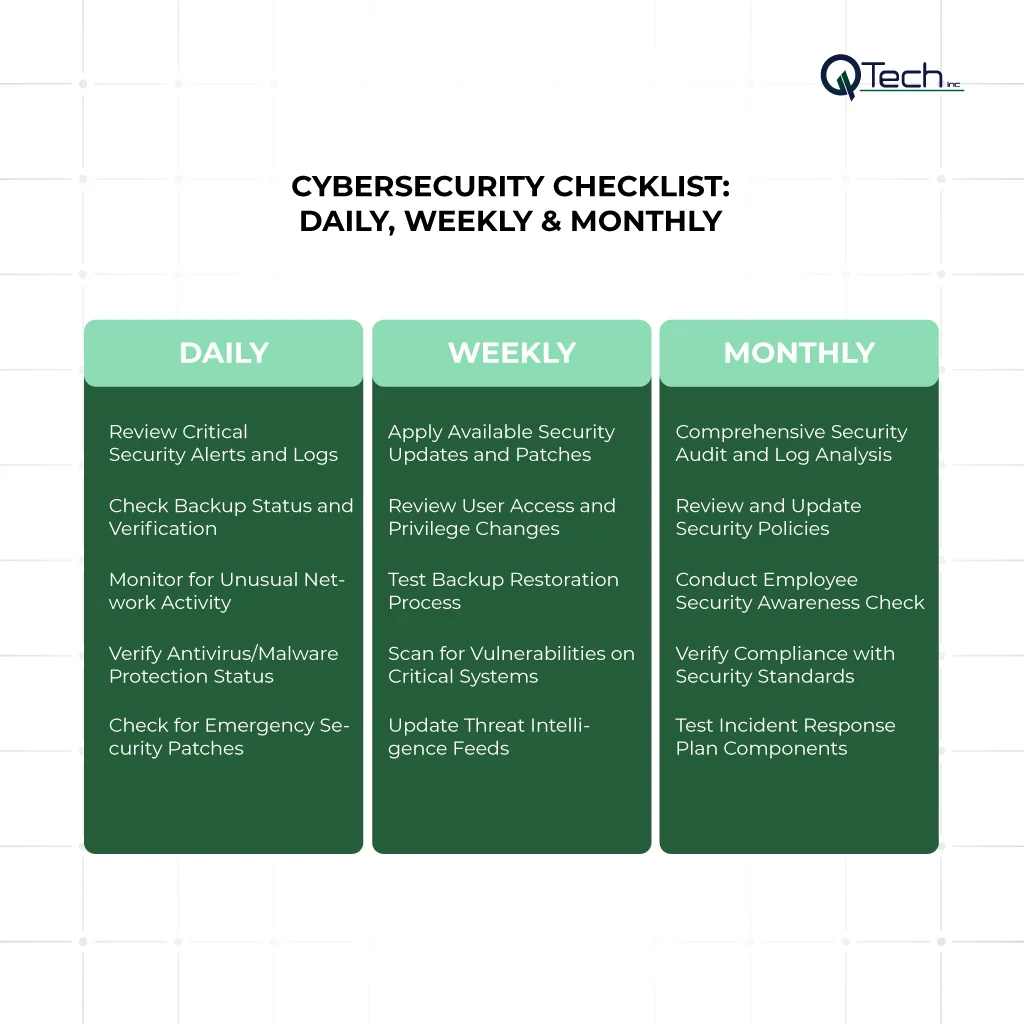
The Daily Cybersecurity Checklist (15-20 Minutes)
1. Review Critical Security Alerts and Logs
Daily security tasks begin with reviewing log data from firewalls, intrusion detection systems, and web applications. A daily security log review allows your security team to spot anomalies before they escalate. By catching suspicious activity early, you can prevent small security events from turning into major incidents.
2. Check Backup Status and Verification
Every day, confirm that backups are not only running but passing backup verification tests. Without verification, a backup may fail silently, leaving your business vulnerable. Regular checks ensure data restoration is possible when emergencies strike.
3. Monitor for Unusual Network Activity
Daily monitoring helps identify vulnerabilities and mitigate risks quickly. Look for spikes in traffic, unauthorized access attempts, or unexpected outbound connections. This step provides early warning signs of compromised accounts or malware activity.
4. Verify Antivirus/Malware Protection Status
Ensure antivirus definitions and endpoint protection are up to date. Security patches for antivirus tools are released frequently, and missing a software update could leave your devices exposed. Consistent verification is one of the simplest cybersecurity best practices.
5. Check for Emergency Security Patches
Vendors often release emergency security patches outside their usual patching process. Apply patches quickly to reduce exposure to newly discovered vulnerabilities. Using patch management tools streamlines the patch deployment process and keeps systems current.
The Weekly Cybersecurity Checklist (30-60 Minutes)
1. Apply Available Security Updates and Patches
Patch management is at the core of weekly tasks. This involves deploying software updates across servers, applications, and endpoints. Proper patch deployment helps reduce the risk of exploitation and strengthens your defenses.
2. Review User Access and Privilege Changes
Each week, review any changes to employee access. Ensure permissions align with job roles and remove unnecessary accounts. A proactive review prevents insider threats and ensures compliance with your security policy update practices.
3. Test Backup Restoration Process
A backup is only as good as your ability to restore it. Weekly tests confirm that backups function as intended. Testing ensures critical files can be recovered, protecting against ransomware and accidental data loss.
4. Scan for Vulnerabilities on Critical Systems
Use vulnerability scanners to detect weaknesses in your network and applications. Weekly vulnerability scanning helps identify vulnerabilities before attackers exploit them. Automated scanning tools provide fast insights into areas that need immediate attention.
5. Update Threat Intelligence Feeds
Stay informed with the latest security logging and threat feeds. Weekly updates keep your incident response team aware of new attack patterns. These insights guide proactive defenses against security risks targeting industries like finance, healthcare, and retail.
The Monthly Cybersecurity Checklist (2-3 Hours)
1. Comprehensive Security Audit and Log Analysis
Once a month, conduct a full log analysis to review all security incidents. This includes examining log data across firewalls, applications, and user systems. Monthly reviews give leadership insights into the overall security posture and recurring issues.
2. Review and Update Security Policies
A security policy update ensures your protocols remain aligned with evolving threats. Policies should address everything from access controls to secure cloud infrastructure checks. Outdated policies can create security gaps and weaken compliance efforts.
3. Conduct Employee Security Awareness Check
Employees are your first line of defense, but also a frequent cause of security events. Monthly training refreshers and phishing simulations help reduce the risk of human error. Reinforcing cybersecurity best practices empowers staff to recognize threats.
4. Verify Compliance with Security Standards
Monthly checks should confirm compliance with frameworks like NIST, ISO, or industry-specific regulations. This verification demonstrates due diligence and protects against penalties, while ensuring security incidents are handled effectively.
5. Test Incident Response Plan Components
A strong incident response plan requires regular testing. Simulate security incidents and evaluate how your incident response team manages them. These drills improve coordination, refine your response plan, and minimize downtime in real-world scenarios.
Best Practices for Scheduling & Ownership
Assign clear responsibility for each task (IT, security team)
Every checklist item should have an owner, whether that’s an internal IT department or an outsourced managed cybersecurity services provider. Clear accountability ensures no task is skipped.
Use automation and schedule recurring jobs
Automation reduces human error and ensures consistency. For example, automated patching process tools can apply patches across systems without manual intervention, freeing your team for strategic work.
Maintain an auditable checklist log
Documenting security tasks provides evidence for compliance audits. An auditable log demonstrates due diligence and offers insights into how past security risks were mitigated.
Prioritize tasks by risk impact
Not all tasks carry equal weight. Prioritize tasks that directly reduce the risk of business disruption, such as vulnerability scanning, patch deployment, and incident response exercises.
Conclusion: & How Q-Tech Inc. Can Help You Implement This Checklist
Cybersecurity isn’t about occasional fixes; it’s about building a disciplined routine. By implementing a cybersecurity checklist that spans daily, weekly, and monthly tasks, businesses can strengthen defenses, identify vulnerabilities early, and prepare for inevitable security incidents.
At Q-Tech Inc., we specialize in tailoring our security checklists to your unique business needs. From secure cloud infrastructure checks to managed cybersecurity services, our experts provide the tools, automation, and guidance your company needs to stay safe. With Q-Tech Inc. as your partner, you gain a proactive security guard against today’s most pressing digital threats.
Take action now because in cybersecurity, consistency isn’t optional; it’s essential.
FAQ
How often should security patches be applied?
Answer – Critical security patches should be applied immediately or within 24-48 hours of release. For other patches, establish a regular weekly patch cycle to minimize disruption while maintaining security. The exact timing depends on the criticality of the system and the severity of the vulnerability.
What is the most common cause of a cybersecurity breach?
Answer – The most common cause of a cybersecurity breach is often human error. This includes falling for phishing scams, using weak passwords, or not following security protocols. Educating employees is one of the most effective ways to prevent a significant number of attacks.
How often should a business back up its data?
Answer – Businesses should perform data backups at least weekly, with daily or even more frequent backups recommended for businesses that handle large volumes of critical data. The key is to have a consistent backup schedule and to store backups securely off-site or in an encrypted cloud service.
Why is Multi-Factor Authentication (MFA) so important?
Answer – MFA is crucial because it adds an extra layer of security beyond just a password. Even if a hacker steals your password, they can’t access your account without the second factor, like a code from your phone or a biometric scan. This single step can prevent the vast majority of credential theft attacks.