
AI tools have made creating content faster and easier than ever before. From brainstorming blog ideas to writing full articles, tools like ChatGPT and Gemini are changing how businesses communicate online. But here’s the big question: how does Google view content made with AI? And what’s the difference between AI-assisted and AI-generated content?
This blog will help you understand the difference, why it matters for SEO, and how to make sure your content still shows up in search engines,even when using AI tools.
Defining AI-Assisted and AI-Generated Content
The two terms may sound similar, but they’re not the same. Let’s break them down in plain language.
What is AI-Assisted Content?
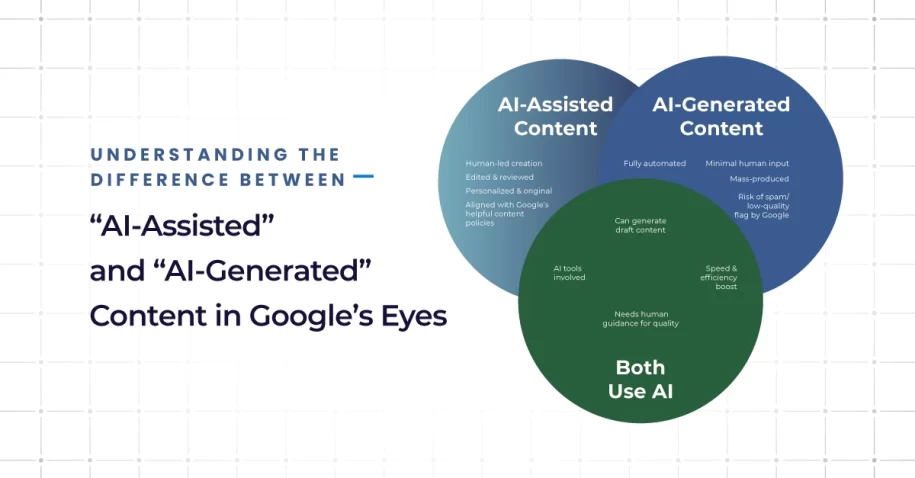
AI-assisted content means that a human is still in control of the writing, but an AI tool is used to help. Think of it like using spellcheck, a grammar tool, or getting help brainstorming ideas. You’re still writing and editing, but the AI is there to make your job easier.
When you use ai assisted tools this way, you’re still adding your own voice, ideas, and experience. This is the kind of content that aligns with Google’s idea of people-first content,content written by people, for people.
What is AI-Generated Content?
Now, AI-generated content is different. This is when a tool writes the whole thing from start to finish, with little or no human editing. It might sound okay at first, but often it misses important things,like original thoughts, facts, or the right tone.
When Google sees content like this, it may flag it as low quality. And while you may be wondering, “does Google penalize AI-generated content?”,the truth is, not always. But if the content is unhelpful, wrong, or clearly written just to trick the system, it might not rank well,or at all.
Google’s Perspective on AI-Driven Content
Google has made one thing clear: it cares more about quality than who or what wrote the content.
Quality Guidelines and E-E-A-T Principles
To decide if content is good, Google uses something called E-E-A-T, which stands for Experience, Expertise, Authoritativeness, and Trustworthiness. Whether your content is written by a person or a machine, it needs to show real knowledge, come from a reliable source, and be helpful to readers.
That’s why ai-generated text that’s not edited by a human often doesn’t perform well,it usually lacks that personal experience or trustworthy tone that Google is looking for.
Need more details? Here’s a useful read on how Google evaluates content.

Recent Updates to Google’s Content Policies
Google recently confirmed that AI content isn’t banned, but low-quality or misleading content,no matter how it’s made,can be penalized. That’s why using ai content detectors, a plagiarism checker, and good editing habits is a smart move.
So, if you’re asking how to make AI content E-E-A-T compliant, the answer is simple: make sure a real person adds value, fact-checks everything, and edits for clarity and tone.
Best Practices for Using AI Tools in Content Creation
AI can be a powerful partner,but it’s not a replacement for real human thinking. Here’s how to use AI the right way.
Blend AI with Human Expertise
Let AI help you with outlines, grammar, or research,but always have a person write or refine the final version. Use tools like ChatGPT or Gemini for support, not shortcuts.
This approach also helps with seo best practices for ai content, since Google values unique, helpful, and accurate information.
Here are a few practical tips:
- Use ai checker tools to check for robotic language
- Always add your personal insights or brand perspective
- Make sure someone reviews the final content for accuracy
- Include links, stats, or quotes to add credibility
Make Your Content Original and Useful
Google can spot content that sounds the same as everything else. If your blog just repeats what’s already online,or worse, what the AI tool found elsewhere,it may not rank at all.
To avoid that:
- Use a plagiarism checker
- Share your team’s real experiences or tips
- Add customer stories or examples
- Label your AI content clearly if needed (see how to label AI content for Google)
- Run your copy through ai content detection tools to check for overuse

How Q-Tech Inc. Can Help Your Content Get Noticed by Google
At Q-Tech, we help businesses create content that gets results. Whether you’re using AI-powered tools or writing everything by hand, we’ll make sure your content meets Google’s standards and helps your site grow.
Here’s what we offer:
- Digital Marketing Services designed to boost your online presence
- SEO Services in Miami that help you show up in search results
- Help using ai content detection tools, SEO strategies, and editing to polish your posts
- Tips for writing human generated content that feels real, fresh, and expert-level
Not sure which type of content you’re using,or how it stacks up? We’ll guide you through it, step by step.
Conclusion
Using AI tools doesn’t mean giving up on human creativity. In fact, the best content today often comes from combining smart tools with real experience and heart. The goal isn’t to trick search engines,it’s to connect with people.
So when it comes to ai-assisted vs ai-generated content, remember: it’s not about choosing sides. It’s about using tools wisely and always putting people first. That’s how you create content that ranks, gets read, and builds trust.
If you’re ready to boost your content the right way,reach out to Q-Tech. Let’s build something better together.