

Introduction: Why ADA Compliance is Non-Negotiable for E-Commerce
In today’s digital-first economy, accessibility is no longer optional—it’s essential. For e-commerce brands, ensuring ADA compliance isn’t just about avoiding lawsuits; it’s about building inclusive, user-friendly online experiences that welcome every customer. The Americans with Disabilities Act (ADA) extends beyond physical spaces—it applies to digital environments too.
An accessible e-commerce website allows all users, including those relying on screen readers, keyboard navigation, and other assistive technologies, to navigate, browse, and make purchases independently. Beyond compliance, digital accessibility drives brand trust and expands market reach, creating opportunities to serve the millions of users who face online accessibility barriers every day.
Understanding the Risks and Requirements
What the Americans with Disabilities Act (ADA) Requires for Websites
The Americans with Disabilities Act (ADA) classifies online businesses as public accommodations, requiring them to provide equal access to all users. In practice, this means your e-commerce website must be perceivable, operable, understandable, and robust. Following the Web Content Accessibility Guidelines (WCAG) helps align your store with these expectations by addressing everything from color contrast requirements to form control and keyboard accessibility.
The Rise of E-Commerce Accessibility Lawsuits
The number of ADA website lawsuits has grown dramatically, targeting businesses that fail to meet accessibility standards. Many ADA lawsuit ecommerce cases involve checkout pages, image alt tags, or inaccessible interactive elements that block users with disabilities from completing a purchase. These legal actions reinforce the urgency for compliance—reactive fixes after a lawsuit can cost far more than proactive accessibility efforts.
The Global Standard for Web Accessibility
Globally, the WCAG serves as the web content accessibility standard. It provides measurable criteria that e-commerce brands can implement to ensure consistency across devices and assistive technologies. Whether your audience uses screen readers, high-contrast settings, or voice input, compliance ensures a seamless user experience for all.
The 4 Pillars of an ADA-Compliant E-Commerce Store
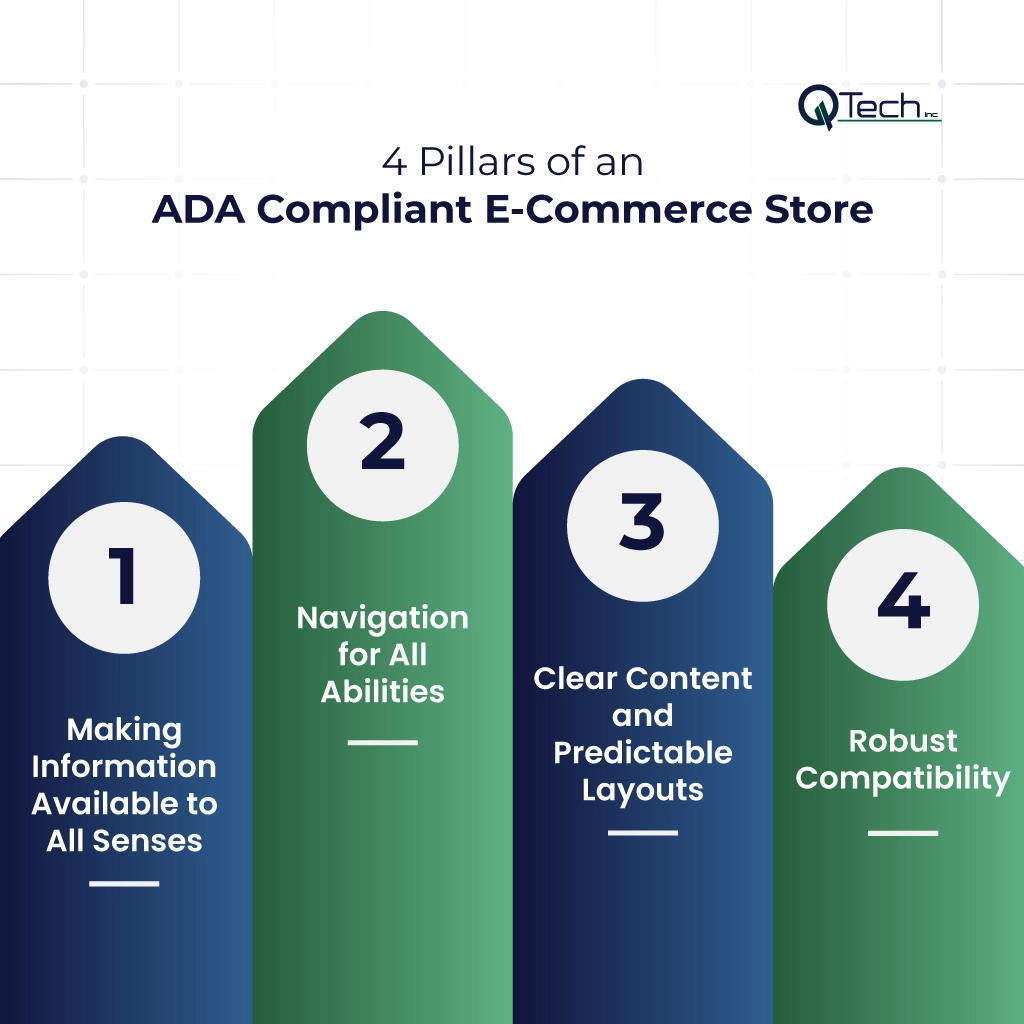
Creating a truly accessible ecommerce website requires implementing the four fundamental WCAG principles: perceivable, operable, understandable, and robust. Let’s break them down.
Pillar 1: Making Information Available to All Senses
Image Alt Text for Product Photos and Icons
Every product image, icon, or button should have descriptive alt text for products. Alt text communicates the purpose or appearance of visual content to screen readers, ensuring shoppers who are blind or visually impaired can understand what’s being displayed. Avoid generic terms like “image” or “photo”—instead, describe the product’s color, size, and purpose.
Video Captions and Audio Descriptions
If your store uses product demo videos, tutorials, or testimonials, include captions and audio descriptions. Captions benefit users with hearing impairments, while audio descriptions help visually impaired users follow visual actions. Together, they make your digital accessibility efforts more complete.
Color Contrast and Text Size Requirements
Meeting color contrast requirements ensures that text stands out against background colors. WCAG recommends a contrast ratio of at least 4.5:1 for body text and 3:1 for large text. Proper color contrast helps users with low vision read comfortably and prevents accessibility issues across different devices.
Pillar 2: Navigation for All Abilities
Keyboard-Only Navigation Through Checkout
Users who cannot use a mouse should still be able to browse and buy products using a keyboard navigation checkout process. This means all interactive elements—buttons, menus, and forms—must be reachable via the tab key and clearly outlined with visible focus indicators.
Focus Indicators and Skip Navigation Links
Focus indicators highlight which element is currently selected when navigating via keyboard. Adding “Skip to main content” links helps users bypass repetitive menus and jump straight to the main content area. This improves efficiency and overall keyboard accessibility.
Avoiding Time-Based Interactions That Can’t Be Extended
Timed pop-ups, checkout expirations, or auto-redirects can create barriers. Users should be able to extend or disable time limits to complete forms or payment steps at their own pace.
Pillar 3: Clear Content and Predictable Layouts
Clear Error Messages in Forms and Checkout
Error messages in form fields should be specific and easy to understand. For instance, “Please enter a valid email address” is more helpful than “Invalid input.” Accessible form control ensures that users with screen reader ecommerce tools receive feedback through audio or text.
Consistent Navigation and Labeling
Maintain a consistent menu, button layout, and labeling system throughout your website. Predictable design patterns reduce confusion and improve the user experience for individuals with cognitive or visual impairments.
Input Assistance for Complex Forms
For forms that handle shipping or payment information, provide hints, autocomplete options, and accessible forms that validate entries automatically. Clear instructions prevent frustration and errors for all users, including those with disabilities.
Pillar 4: Robust Compatibility
Semantic HTML for Screen Readers
Use proper HTML markup to define headings, lists, and buttons. Semantic HTML structures information logically, enabling assistive technologies like screen readers to interpret your website accurately.
ARIA Labels for Complex Widgets
Advanced features—like dropdowns, sliders, or carousels—require ARIA labels to describe their roles and states. Proper ARIA use ensures that interactive elements remain accessible to all users, regardless of device or disability.
Testing with Assistive Technologies
Conduct both automated and manual checks using assistive technology like JAWS or NVDA. Testing ensures that no accessibility issues remain hidden and your site is optimized for real-world usage.
E-Commerce Specific Compliance Checklist
Product Pages: Images, Descriptions, and Options
Every product should include detailed descriptions, proper alt text, and clear dropdown menus for size or color. Ensure all images are tagged correctly for ADA online store compliance.
Shopping Cart and Checkout Process
Your cart and checkout should support keyboard navigation and display accessible labels on all fields. Avoid complex or timed interactions that hinder completion.
Forms: Registration, Shipping, and Payment
Design accessible forms with proper field labels, input validation, and visible error indicators. Include clear instructions and ensure form fields can be navigated entirely via keyboard.
Search Functionality and Filters
Enable voice and keyboard input for search bars and filters. Results should be readable by screen readers and visually organized for clarity.
How to Conduct an ADA Compliance Audit of Your Store
Automated Testing Tools and Their Limitations
Automated scanners like WAVE or Axe are great for initial evaluations, but can miss key details. They detect missing alt tags or poor contrast, but not the overall user experience.
Manual Testing Checklist
Perform manual checks to review navigation, keyboard flow, and screen reader compatibility. Use real assistive technologies and ensure every action—from viewing a product to completing payment—is fully operable.
When to Hire Professional Accessibility Auditors
For a complete accessibility audit, consider hiring professional testers who specialize in digital accessibility. They simulate real user behavior and identify barriers automation may overlook. This process ensures your site not only meets legal standards but delivers genuine usability improvements.
Conclusion: How Q-Tech Inc. Can Help Your E-Commerce Business Become ADA-Compliant
ADA compliance isn’t a one-time task—it’s an ongoing commitment to inclusivity and innovation. By implementing these practices, businesses can avoid costly ADA website lawsuits, enhance user experience, and expand their customer base.
At Q-Tech, Inc., our team of experts helps businesses design and develop e-commerce websites that align with ADA compliance ecommerce standards. Through digital marketing strategies and accessibility-focused development, we ensure your store not only meets legal requirements but also delivers exceptional usability for everyone.
When your brand invests in ADA compliance for an e-commerce guide to accessible online stores, you’re not just checking a box—you’re building a digital experience that welcomes all customers, strengthens trust, and sets a new standard for inclusive online commerce.
FAQ
Q: Is ADA compliance mandatory for e-commerce websites?
A: Yes, courts have consistently ruled that the ADA applies to e-commerce websites as “places of public accommodation.” While specific regulations are still evolving, the legal standard is clear: online stores must be accessible to people with disabilities. Multiple businesses have faced significant lawsuits and settlements for non-compliance.
Q: What are the WCAG guidelines for ADA compliance?
A: For ADA compliance, most legal settlements require conformance with WCAG 2.1 Level AA. This includes standards for:
- Text alternatives for non-text content
- Captions for prerecorded audio and video
- Information and structure that can be programmatically determined
- Keyboard accessibility for all functionality
- Color that is not used as the only visual means of conveying information
Q: Can I get sued if my e-commerce store isn’t ADA compliant?
A: Yes, thousands of e-commerce businesses face ADA lawsuits each year. These typically come from “drive-by” lawsuits where plaintiffs systematically test websites for accessibility barriers. The most vulnerable are medium to large e-commerce businesses with noticeable accessibility issues in their checkout process or product navigation.
Q: What are the most common ADA violations on e-commerce sites?
A: The most common violations include:
- Missing alt text on product images
- Inaccessible forms in checkout and registration
- Poor color contrast affecting text readability
- Lack of keyboard navigation through entire purchase flow
- Missing video captions for product demonstrations
- Inaccessible pop-ups and modals