

If you have ever wondered why two websites with similar content perform differently in Google search, the answer often goes beyond keywords and backlinks.
It reflects a real shift in how Google evaluates quality. Today, strong content still matters, but so does the way that content is delivered. When a page feels slow, unstable, or hard to use, both visitors and search engines notice.
What are Core Web Vitals?
Core web vitals are a set of performance benchmarks Google uses to evaluate real user experience on a website. They focus on how quickly content appears, how responsive a page feels, and how stable the layout remains while page loads continue in the background. In other words, they are page experience signals that help Google understand whether a visitor is likely to have a smooth or frustrating session.
Introduction – What Are Core Web Vitals?
At a practical level, Core Web Vitals help connect technical performance with business results. They show whether a site feels fast enough to keep attention, usable enough to encourage action, and polished enough to build trust. For businesses that rely on visibility in search results, these metrics matter because they influence how people interact with a website before they ever become a lead, customer, or subscriber.
Why Google made page experience a ranking factor
Google made page experience a ranking factor because it wants search engines to reward pages that do more than simply answer a question. A strong answer on a slow, cluttered, or unstable page creates friction.
That is why page experience signals now sit alongside content relevance. Factors like mobile-friendly design, safe browsing, and even disruptive elements such as intrusive interstitials all shape the experience. Google’s goal is clear: better search results should also deliver better usability.
Why Core Web Vitals are Critical for AI Search Engines (AEO)
As AI-driven search engines and answer engines become more prominent, performance becomes even more important. These platforms are designed to identify reliable, accessible content quickly, and they tend to favor sites that offer clear structure and fast delivery. If your website is slow, difficult to interact with, or visually unstable, it sends a weak quality signal. In an AEO environment, speed and clarity support discoverability just as much as relevance does.
The Three Core Web Vitals Metrics
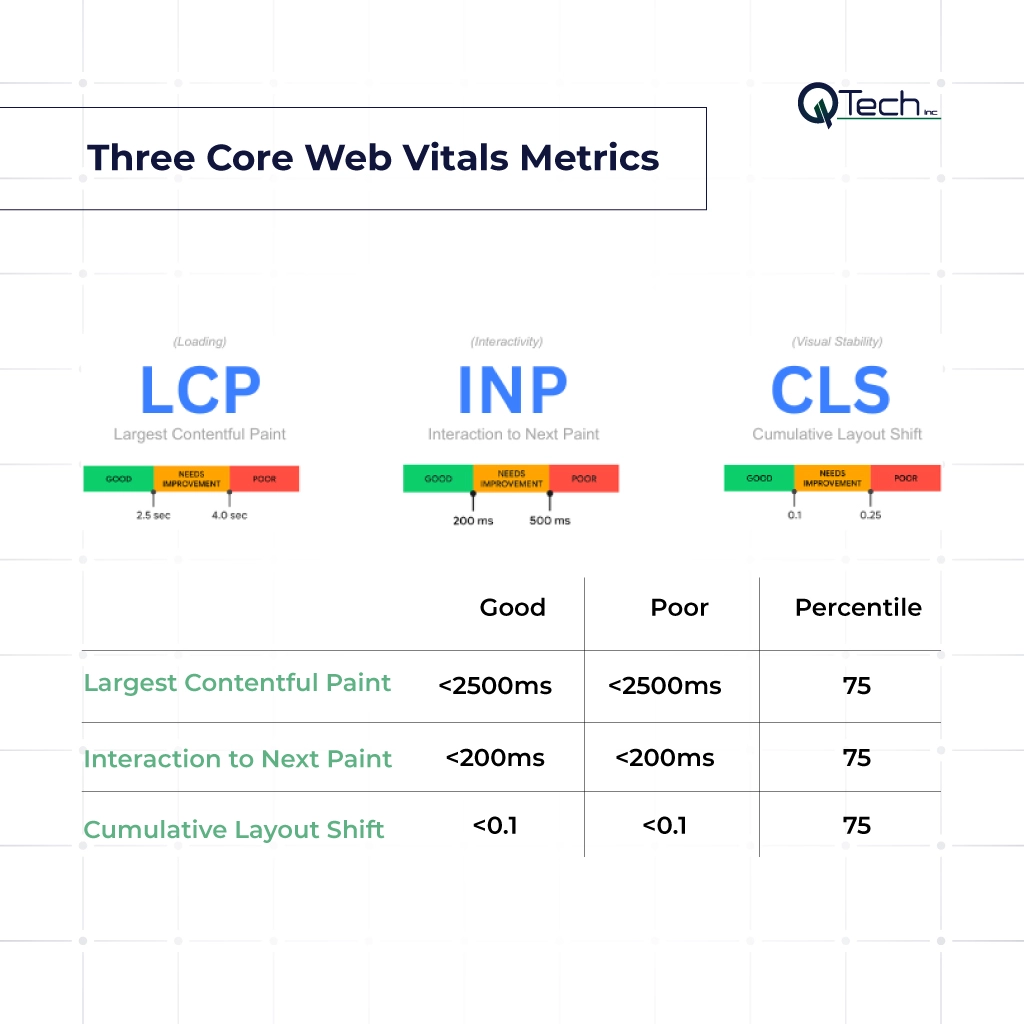
Google’s framework centers on three measurements that capture how users experience a page in the real world. Together, they reveal whether the first impression is strong, whether the site responds promptly, and whether visitors can trust the layout as content appears on screen.
- Largest Contentful Paint (LCP) – Loading Performance
- Interaction to Next Paint (INP) – Responsiveness
- Cumulative Layout Shift (CLS) – Visual Stability
Largest Contentful Paint (LCP) – Loading Performance
Largest contentful paint (LCP) measures how long it takes for the largest visible content element on a page to appear, such as a hero image, banner, or major text block. Good largest contentful paint performance tells users that the page is loading properly and that the main message is arriving without delay.
Teams often compare LCP measurements with contentful paint FCP to understand whether the first visible element appears early, but the most important content still arrives too late. When load time drags, visitors lose confidence fast.
Interaction to Next Paint (INP) – Responsiveness
Interaction to next paint inp measures how quickly a website responds after a user clicks, taps, or types. It is designed to show whether the page feels smooth during real interaction, not just during initial load. Businesses that want to measure inp should pay close attention to heavy JavaScript, delayed event handlers, and long tasks that block the browser. When paint inp performance is poor, buttons feel sticky, forms lag, and the site seems broken even if it technically loads.
Cumulative Layout Shift (CLS) – Visual Stability
Cumulative layout shift (CLS) measures how much content moves unexpectedly while a page is loading. This is the metric behind those frustrating moments when a user tries to tap a button, and it suddenly jumps. Cumulative layout shift is especially important on pages with ads, images, embeds, or dynamic content. Poor layout shift CLS performance leads to unexpected layout shifts that damage trust, increase misclicks, and make the website feel unfinished.
How Core Web Vitals Affect Google Rankings
Core Web Vitals are not the only ranking signal in SEO, but they can influence how Google compares pages with similar relevance. When multiple pages satisfy search intent at a similar level, experience becomes more important. That is where performance can help create separation.
Page experience as a tie-breaker
Google has made it clear that page experience is not a replacement for relevance, but it does act as an experience signal when content quality is already competitive. If two pages answer the same query equally well, the page with better usability may have the edge. This is why performance optimization is often the difference between a page that sits in the middle of the rankings and one that earns more visibility.
Mobile-first indexing and Core Web Vitals
Because Google uses mobile-first indexing, the mobile version of your website carries enormous weight. A desktop site may look polished, but if mobile page loads are slow or interactions feel delayed, rankings can suffer. Mobile users are also more sensitive to lag, cramped layouts, and shifting buttons. For that reason, Core Web Vitals should always be reviewed through a mobile lens first.
Real-world impact on organic traffic
The impact goes beyond rankings alone. Better performance often leads to stronger engagement, more page views, and higher conversion rates, which can support organic traffic growth over time. A fast site also helps reduce abandonment on service pages, landing pages, and blog posts. When technical issues pile up, whether that means slow templates, broken links, or unstable layouts, they weaken both visibility and trust.
Tools to Measure and Debug Core Web Vitals
Improving performance starts with measurement. Fortunately, Google provides several tools that make it easier to see where a website is struggling and why those issues are happening.
Google Search Console (Core Web Vitals report)
The Core Web Vitals report in Google Search Console is valuable because it reflects real-world field data from actual users. It shows groups of URLs that are performing poorly, need improvement, or are already passing. This helps businesses prioritize fixes at scale rather than guessing which pages need attention first.
PageSpeed Insights & Lighthouse
PageSpeed Insights and Lighthouse help diagnose the reasons behind poor scores. PageSpeed Insights combines field data with lab data, while Lighthouse gives a controlled snapshot of performance during testing. Together, they can reveal render-blocking files, oversized media, script delays, and layout problems that affect core web vitals.
Actionable Fixes for Each Core Web Vital
Once a problem is identified, the next step is targeted improvement. The goal is not to chase scores for their own sake, but to remove friction that hurts usability and visibility.
Fixing LCP – optimize images, server response, render-blocking resources
To improve LCP, start with heavy assets and slow delivery. Compress large images, use modern formats, reduce server response times, and remove unnecessary render-blocking resources. Prioritizing above-the-fold content and simplifying bloated templates can make the main content appear much faster.
Fixing INP – break up long tasks, optimize event callbacks
To improve INP, reduce browser workload during interaction. Break up long tasks, defer nonessential scripts, and optimize event callbacks so the interface can respond quickly. Forms, menus, filters, and booking tools should all be tested to ensure they feel immediate rather than delayed.
Fixing CLS – reserve space for ads/images, avoid inserting content above existing content
To improve CLS, reserve space for images, ads, banners, and embedded media before they load. Avoid injecting content above existing content unless it is absolutely necessary. Stable layouts create a smoother user experience and prevent avoidable frustration on both desktop and mobile devices.
Conclusion – Core Web Vitals Are a User Experience Signal
Core Web Vitals matter because they reflect how real people experience a website, not just how a tool grades it. They influence perception, engagement, and visibility in search.
When pages load quickly, respond smoothly, and remain visually stable, they send a stronger message to both users and Google. In that sense, Core Web Vitals are not just a technical checklist. They are a direct expression of digital quality.
How Q-Tech Inc. Helps Businesses Pass Core Web Vitals
At Q-Tech Inc., we approach performance as part of a broader growth strategy. That means identifying what is slowing a site down, uncovering weak templates, reviewing design and development decisions, and resolving the issues that hold back rankings and conversions.
Through custom website development and strategic support tied to our AI SEO service, we help businesses align design, speed, and search performance. A proper technical seo audit can reveal where pages are falling short, but lasting gains come from fixing the root problems with a clear plan and an experienced team.
FAQ
Q: What is the most important Core Web Vital in 2026?
A: While all three are important, INP (Interaction to Next Paint) has become the critical differentiator. Because it measures the responsiveness of the entire user session (not just the first click), it is the most accurate reflection of whether a user will find a site “frustrating” or “seamless.”
Q: How does LCP affect my Google ranking?
A: LCP (Largest Contentful Paint) is a “weighted” ranking signal. If two pages have equally high-quality content, Google will rank the one with the faster LCP higher because it offers a better user experience. A poor LCP (over 4 seconds) can result in a significant ranking penalty.
Q: Can I pass Core Web Vitals without a developer?
A: Some improvements can be made via CMS plugins (like caching or image compression), but achieving “Green” scores often requires technical fixes like Critical CSS delivery, Javascript execution optimization, and Server-level performance tuning—tasks that Q-Tech’s engineering team specializes in.
Q: Do Core Web Vitals affect mobile rankings more than desktop?
A: Yes, because Google uses mobile-first indexing. Poor mobile Core Web Vitals directly harm your mobile search visibility, which now dominates most searches.
Q: Can a slow CLS alone cause a ranking drop?
A: Potentially. If your page has high layout shift (e.g., ads pushing content), Google may rank a more stable page higher, especially for competitive queries where user experience is a tie-breaker.
Q: How long does it take to see ranking improvements after fixing Core Web Vitals?
A: Google recrawls and reprocesses pages over weeks. Many sites see ranking changes within 2-4 weeks after fixes are live, but full impact may take 2-3 months.