
When businesses explore website development, the choice of a Content Management System (CMS) is one of the most critical decisions they’ll face. Your CMS impacts speed, security, flexibility, and long-term scalability.
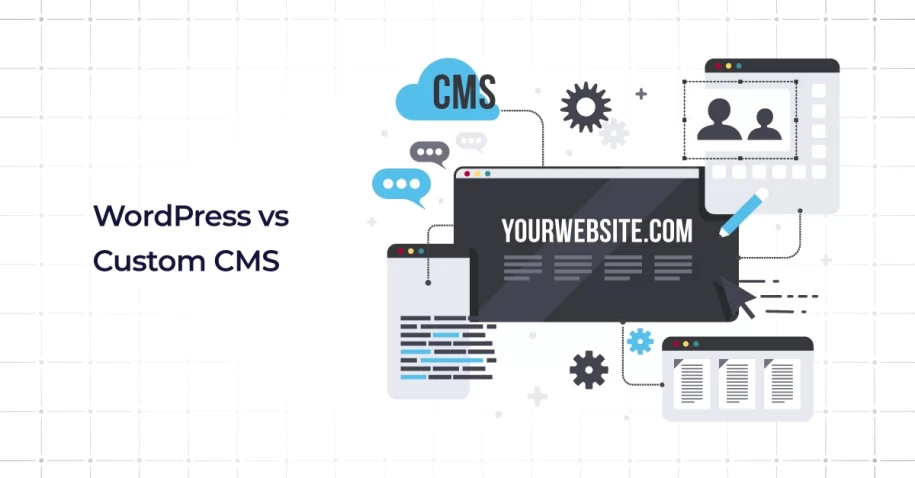
The debate often comes down to WordPress vs Custom CMS: What Is Best for Your Business? Both options offer unique strengths and limitations. Whether you are building a simple company site, a platform for online stores, or enterprise CMS platforms with automation, your choice will define your digital future. This guide explores the advantages, challenges, and comparisons between WordPress and custom-built systems to help you choose a CMS wisely.
Understanding WordPress: Pros
Ease of setup & large plugin/theme ecosystem (cost-effective start)
WordPress’s advantages start with its ease of use. As an open source platform, it powers millions of WordPress websites worldwide. With user-friendly interfaces, plugins, and themes, and a straightforward website builder experience, WordPress allows businesses to create functional sites quickly.
Entrepreneurs and small businesses can launch WordPress sites without hiring teams of web developers. From customizing background color to choosing a custom domain, the setup is simple. WordPress hosts also make installation effortless, offering cost-effective packages that meet most small-business needs.
Strong SEO support & many existing resources/community
Another reason behind WordPress websites’ popularity is their built-in search optimization tools. Plugins like Yoast or Rank Math extend SEO capabilities and improve user experience.
WordPress’s massive community offers guides, tutorials, and long-term insights to strengthen your website design strategy. Whether building online stores or blogs, the available WordPress plugin library ensures you can enhance your content management system CMS efficiently.
Faster time to market & frequent updates
Speed matters. WordPress websites can be launched in days thanks to templates, drag-and-drop tools, plugins, and themes. Frequent updates provide security patches and usability improvements, ensuring ongoing support for businesses that must adapt quickly.
WordPress advantages also include fast deployment for mobile apps, e-commerce, and online stores. With an open source foundation and broad ecosystem, WordPress remains one of the most versatile solutions in website development.
Custom CMS: Pro
Complete flexibility & tailor-made features
While WordPress offers convenience, custom-built systems shine with flexibility. A Custom CMS is ideal when businesses need features that go beyond what a website builder or WordPress plugin can achieve. For example, cms for enterprise applications often requires integration with mobile apps, advanced analytics, or automation workflows.
These projects demand unique key features built for your organization. A custom CMS allows developers to implement cascading style sheets (CSS), custom CSS advantages, and workflows specific to your processes, giving you capabilities that WordPress sites cannot replicate.
Better performance, lean code, fewer unnecessary features
Custom CMS platforms avoid the “bloat” of plugins and themes common in WordPress websites. Instead, they rely on optimized code designed around the required functionality. This lean architecture ensures faster performance and better scalability for enterprise CMS platforms.
For industries handling large databases, custom-built solutions provide a smoother user experience by eliminating unnecessary functions. Long-term benefits include lower resource usage and the ability to tailor content management system elements directly to business needs.
Enhanced security via minimal attack surface & custom architecture
Cybersecurity is a top concern for enterprises. A custom CMS offers superior protection by reducing reliance on third-party tools. Developers build specific data workflows, monitoring systems, and authentication processes into the architecture. With reduced plugin dependency, businesses lower the risks of vulnerabilities.
Custom CSS advantages and advanced cascading style sheets also allow developers to implement secure coding practices tailored to your systems. This approach is ideal for companies handling sensitive information, online stores, or communication-heavy platforms where user data is paramount.
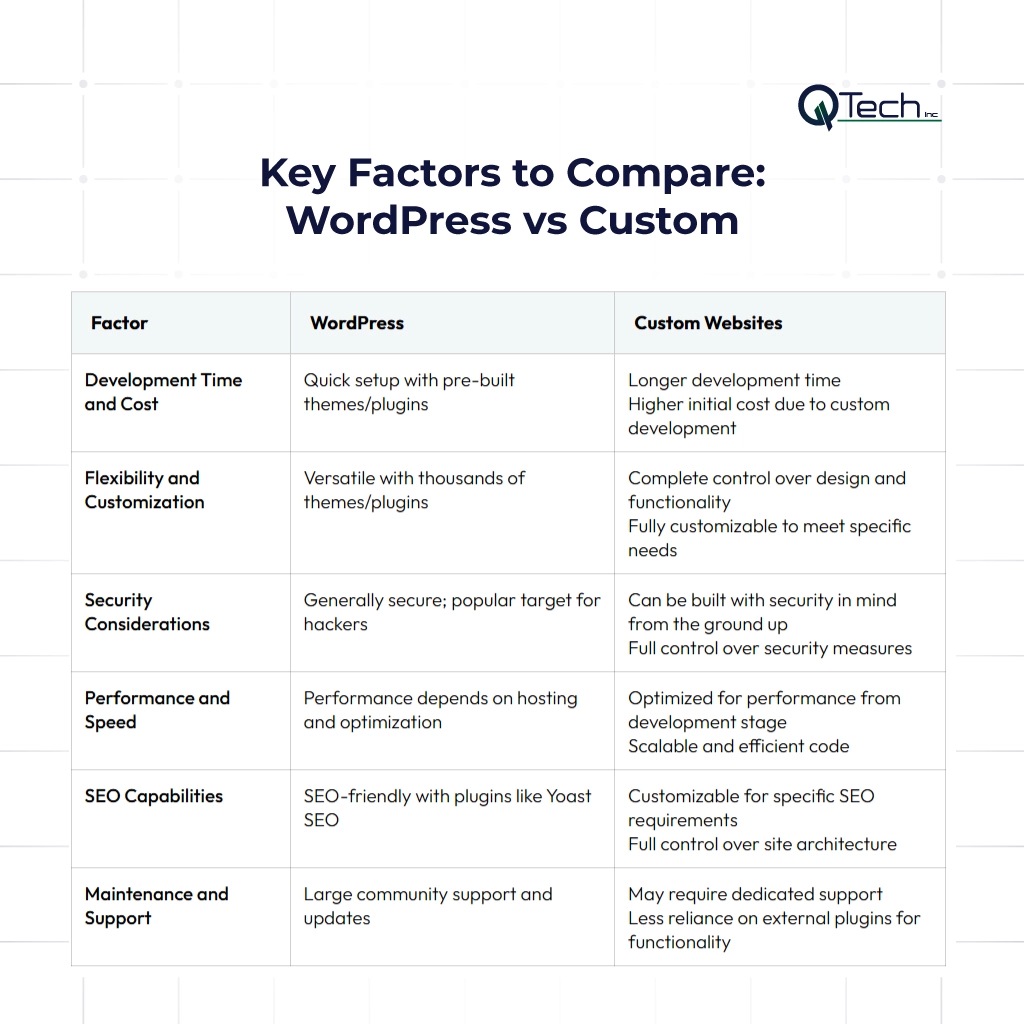
Key Factors to Compare: WordPress vs Custom CMS
Development Time and Cost
WordPress sites benefit from rapid deployment and lower upfront costs. Businesses with limited budgets find this approach appealing. However, custom CMS platforms demand higher initial investment. While more expensive, they often provide long-term returns by avoiding plugin maintenance headaches and offering unique custom-built functionality.
Flexibility and Customization
When comparing WordPress vs custom website solutions, flexibility is the key differentiator. WordPress websites rely on plugins, which may not always deliver enterprise-grade solutions. Custom systems, on the other hand, provide full control over background color, content flows, and integration with mobile apps. This makes them the better CMS for enterprise projects.
Security Considerations
Security is one of the most important factors in choosing a CMS. WordPress requires constant updates, plugin monitoring, and web developers to maintain stability. In contrast, custom CMS platforms can be hardened with enterprise-level protections. These systems provide dedicated, ongoing support tailored to your workflows, ensuring compliance and safety.
Performance and Speed
WordPress performance can be strong, but it depends heavily on optimization. Too many plugins reduce speed. Custom CMS performance, however, is streamlined since it is designed with key features in mind. This makes it ideal for enterprise cms platforms that require a consistent, high-speed user experience.
SEO Capabilities
WordPress’s advantages in SEO are unmatched for small to medium websites. With plugins, optimization is simple. But custom CMS platforms allow SEO features to be integrated directly into the architecture. By aligning with content strategies during website design, enterprises gain flexibility for advanced keyword targeting.
Maintenance and Support
WordPress relies on a community-driven ecosystem. While this offers resources, it also means ongoing maintenance of plugins. Custom CMS solutions come with dedicated web developers who provide ongoing support and long-term system improvements. Both approaches require resources, but the scale of investment depends on your business’s growth strategy.
Hybrid or Headless CMS as a Middle Ground
What is a headless CMS & when does it help
A headless CMS represents an alternative that blends flexibility with ease of use. By separating the backend content management system from the frontend, businesses can deliver content across multiple platforms: mobile apps, online stores, or even IoT devices. This approach improves user experience by supporting omnichannel communication and ensuring content consistency. Headless CMS platforms are particularly useful for companies managing enterprise cms platforms that require robust integrations across devices.
Common Mistakes When Choosing a CMS
Over-estimating what WordPress can do with plugins alone
While plugins and themes provide convenience, they are not limitless. Relying solely on them can bloat performance, compromise security, and limit scalability. Businesses must weigh WordPress vs custom CMS to determine when plugins are enough and when custom solutions are required.
Ignoring long-term maintenance costs of custom CMS
Custom built solutions are powerful but come with responsibilities. Enterprises often underestimate the resources needed for long term upkeep. Factoring in maintenance during website development planning ensures your CMS remains sustainable.
Underestimating security and update burdens
WordPress websites require frequent updates to stay secure, while custom CMS platforms need dedicated web developers to maintain performance. Failing to plan for ongoing support leads to vulnerabilities. A balanced strategy ensures your CMS aligns with your long-term digital goals.
Conclusion: How Q-Tech Inc. Can Help You Pick & Implement the Right CMS
The choice between WordPress vs custom CMS depends on your goals, budget, and long-term strategy. WordPress advantages include affordability, speed, and plugins that make it ideal for small businesses and online stores. A Custom CMS provides custom css advantages, enterprise-level security, and flexibility, making it the better fit for large organizations exploring wordpress vs custom website comparisons. Hybrid solutions like headless CMS bridge the gap, delivering content seamlessly across mobile apps and enterprise cms platforms.
At Q-Tech Inc., we guide businesses through these decisions. Our WordPress creation services help you launch user-friendly websites quickly, while our expertise in custom-built CMS ensures scalability for enterprise cms platforms. Whether you need ongoing support, website design tailored to your brand, or a future-proof content management system, we provides the key features to succeed.
Choosing the right CMS is more than a technical decision—it’s about shaping your brand’s digital presence. By aligning with us, you gain a partner that understands WordPress vs custom cms, what is best for your business, supports your customer journey, and helps you adapt to transformative digital trends.
FAQ
Is a custom CMS better than WordPress?
Answer – “Better” depends entirely on your needs. WordPress is better for most standard websites (blogs, business sites, e-commerce) due to its low cost, ease of use, and vast ecosystem. A custom CMS is better for highly specialized applications requiring unique workflows, superior performance, or tight integration with proprietary systems where off-the-shelf solutions are limiting.
Is WordPress secure enough? Aren’t plugins risky?
Answer – WordPress has good security if best practices are followed—use trusted plugins, keep everything updated, limit plugin count, strong credentials. But vulnerabilities in plugins/themes are common. Custom CMS allows finer control over security but also requires disciplined maintenance.
When should you choose a custom CMS over WordPress?
Answer – If your project requires unique, complex features not well supported via plugins, you need top performance, custom workflows, high security, or want control over every aspect of the system. Also when you have resources to build and maintain it.
Can I switch from WordPress to a custom CMS later?
Answer – Yes, but it’s a complex and costly process akin to rebuilding your website from the ground up. It involves migrating all content, designs, and functionality. It’s far better to make the right decision upfront based on your 3-5 year business plan rather than planning for a future migration.