

A cybersecurity risk assessment reviews the people, data, devices, systems, and vendors a business relies on, identifies potential threats and weak points, and ranks the harm each could cause — so a business can fix the highest-risk issues first instead of guessing where to start. A cyber incident can stop a small business in minutes: a stolen password can expose email, a failed backup can slow recovery for days, and a weak vendor account can open a path straight into company systems. That’s why a cybersecurity risk assessment belongs in normal business planning, not just in the aftermath of an incident. This guide walks through a complete 2026 framework for running one.
Key Takeaways
- A cybersecurity risk assessment identifies what a business relies on, what could threaten it, and how much each threat could actually hurt the business — then ranks fixes by risk, not by convenience.
- Most small businesses assume antivirus and a firewall are enough — they don’t cover cloud access, remote work, old accounts, shared passwords, vendors, or untested backups.
- A cybersecurity audit and a risk assessment are related but different: an audit checks whether required controls are in place; a risk assessment asks what could go wrong and how much it would hurt.
- The core process follows seven steps: identify assets, identify threats, identify vulnerabilities, evaluate risk level, prioritize high-risk issues, implement controls, and continuously monitor.
- A practical checklist should cover people and access, devices and endpoints, network and cloud security, data protection and backup, and vendor and third-party risk.
- Risk assessment needs differ by industry — healthcare, law firms, and service-based businesses each carry different priority areas.
- Most small businesses should run a full assessment at least once a year, and after any major change — a new office, a cloud move, a new vendor, or a security incident.
What Is a Cybersecurity Risk Assessment?
A cybersecurity risk assessment reviews the people, data, devices, systems, and vendors a business relies on, looking for potential threats, weak points, and the harm an event could cause. The process helps a business identify risk before it becomes an incident, aligning internal controls with the key components of a robust cybersecurity strategy. This yields a risk-based plan where high-risk issues are prioritized, offering far more value than an unfocused security checklist.
What Most Small Businesses Get Wrong About Cybersecurity Risk Assessment
Many small businesses assume security starts and ends with antivirus and a firewall. Those tools genuinely help, but they don’t cover cloud access, remote work, old accounts, shared passwords, vendor relationships, or backups — all areas where real risk tends to accumulate quietly over time.
Another common mistake is waiting for a breach to prompt a review. Staff and systems change constantly — new accounts and apps appear regularly, and if no one reviews access on a regular basis, an old username and password can keep working long after it should have been disabled. A genuinely useful risk assessment process asks a more specific question than “are we secure”: what could actually stop sales, delay service, expose client data, or keep staff from doing their jobs.
Difference Between a Cybersecurity Audit and a Risk Assessment
An audit and a risk assessment are related but answer different questions: an audit asks “are we doing what we said we would do,” while a risk assessment asks “what could go wrong, and how much could it hurt the business.” A company can pass an audit — meaning its documented policies and controls are technically in place — and still carry serious, unaddressed cybersecurity risk, because an audit doesn’t necessarily evaluate how much actual harm a gap could cause.
What Is a Cybersecurity Audit?
A cybersecurity audit checks whether required rules and controls are actually in place. It typically reviews policies, system logs, configuration settings, and evidence that staff are actually following the documented procedures.
What Is a Cybersecurity Risk Assessment?
A cybersecurity risk assessment studies threats, vulnerabilities, and business impact together, to answer a more practical question: what could actually go wrong, and how much would it hurt if it did. This is why a business can technically pass an audit and still be carrying meaningful risk the audit alone wouldn’t have surfaced.
Quick Reference: The 7-Step Cybersecurity Risk Assessment Framework
| Step | What It Covers |
| 1. Identify Critical Assets | Systems, data, and processes the business can’t operate without |
| 2. Identify Potential Threats | Events that could harm those assets — cyber and non-cyber alike |
| 3. Identify Vulnerabilities | Weak points that could let a threat succeed |
| 4. Evaluate Risk Level | Rate each issue by likelihood and impact |
| 5. Prioritize High-Risk Issues | Fix what’s both likely and costly first |
| 6. Implement Security Controls | Apply the specific fixes each risk actually needs |
| 7. Continuously Monitor and Review | Repeat and reassess as the business changes |
Note on this framework: this structure reflects widely recognised risk assessment methodology, including principles drawn from established frameworks like NIST, layered with how Q-Tech Inc. applies this process for small business clients. The right depth and frequency still depends on your industry, size, and compliance requirements.
What Q-Tech Inc. Looks For in the First 30 Minutes of a Cybersecurity Risk Assessment
At the start of any assessment, Q-Tech Inc. looks for immediate exposure first. The initial review focuses on user access, endpoint protection, network controls, cloud settings, backups, and administrator rights — the goal is to spot anything that may need urgent action and give the security team an early, honest view of the environment before going deeper.
Vulnerability Categories We Check Before Anything Else
We pay close attention to a specific set of categories early in every assessment: weak passwords, missing multi-factor authentication, outdated software, unprotected remote access, unmanaged devices, overly broad admin rights, and untested backups.
A stolen password alone should never be enough to complete a login. A second authentication method — such as an authenticator app — adds a real barrier; many businesses use Microsoft Authenticator for this. Two-step protection, often called two-factor authentication (2FA), is especially important on email, finance tools, cloud platforms, and admin accounts specifically, since those are the accounts that cause the most damage if compromised.
What We Almost Always Find in a Small Business Cybersecurity Assessment
Most small business environments have a mix of strong controls and real gaps. We consistently see old user accounts that were never deactivated, uneven patching across devices, shared credentials used by multiple staff, weak or untested backup processes, and cloud tools added without ever going through a full security review.
These findings usually point to the same underlying story: security hasn’t kept pace with the business’s own growth. That’s not a failure — it’s simply what happens when a business scales faster than its IT processes do — but it gives leadership a clear, concrete place to start fixing things.
How to Conduct a Cybersecurity Risk Assessment for Your Small Business
These seven steps keep the assessment focused and prevent it from turning into an unfocused audit of everything at once.
- Step 1 — Identify Critical Business Assets
- Step 2: Identify Potential Threats
- Step 3: Identify Vulnerabilities
- Step 4: Evaluate Risk Level
- Step 5: Prioritize High-Risk Issues
- Step 6: Implement Security Controls
- Step 7: Continuously Monitor and Review
Step 1 — Identify Critical Business Assets.
List the systems and data the business genuinely cannot operate without — email, customer files, payment systems, cloud storage, laptops, servers, network equipment, business applications, and admin accounts. Also list key processes, such as payroll, sales, scheduling, billing, or client service.
Step 2 — Identify Potential Threats.
List the events that could harm those assets. Common threats for small businesses include phishing, stolen passwords, ransomware, malware, business email compromise, lost devices, insider misuse, and vendor-related attacks. A cyber threat isn’t the only concern worth listing — power loss, a bad software update, a failed cloud service, or a damaged backup can stop work just as effectively.
Step 3 — Identify Vulnerabilities
Find the specific weak points that could let a threat actually succeed — missing patches, poor password habits, open remote access, outdated systems, weak staff training, overly broad admin rights, or incomplete backups. This step is what connects a threat to a real weakness, and shows exactly where action matters most. Evaluating staff behavior and addressing the common mistakes employees makes during cybersecurity training helps eliminate critical human gaps
Step 4 — Evaluate Risk Level
Rate each identified issue by likelihood and impact — a simple low, medium, high scale works well for most small businesses. Think beyond repair cost alone: include lost work time, lost sales, legal obligations, client impact, recovery time, and higher cyber insurance premiums, and long-term damage to trust in your impact assessment.
Step 5 — Prioritize High-Risk Issues
Fix the issues that are both likely and costly first. An exposed admin account or a failed backup should rank well above a minor issue on a low-value device, even if the smaller issue feels easier to fix.
Step 6 — Implement Security Controls
Choose security measures that directly reduce the risks identified — this may include patching, stronger access rules, endpoint protection, staff training, encryption, better backups, email security, and network controls. The goal is to mitigate the specific risks found, not to buy every available security tool. Organizing this work around broader corporate cybersecurity strategies or established frameworks—like NIST’s structure covering governance, protection, detection, and recovery—helps businesses scale their security efforts without getting overwhelmed.
Step 7 — Continuously Monitor and Review
Risk changes over time. New staff, new devices, new apps, new vendors, and new work locations can all create new gaps that didn’t exist at the last review. Review high-risk items regularly, and repeat the full assessment after major system changes, security events, office moves, or new compliance requirements.
The Cybersecurity Risk Assessment Checklist
Use this checklist as a practical starting point for your next review.
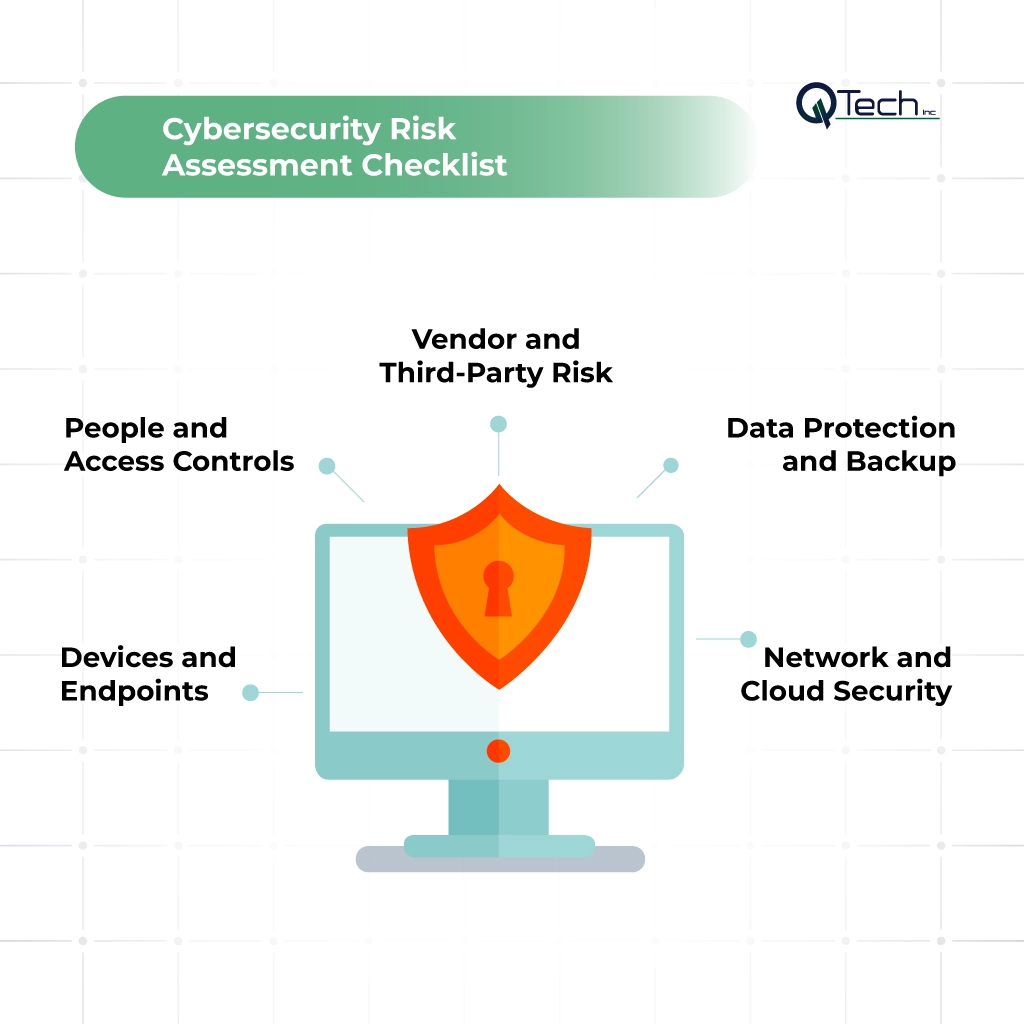
People and Access Controls
- Give each user their own individual account
- Limit admin rights to only those who genuinely need them
- Remove former staff access quickly after departure
- Enforce strong password rules
- Turn on multi-factor authentication for key systems
- Regularly check who can access sensitive files, and whether that access is still actually needed
Devices and Endpoints
- Maintain an inventory of computers, servers, phones, and other devices
- Confirm devices receive regular updates and run active endpoint protection
- Use encryption where it fits the device and data type
- Have a clear plan in place for lost or stolen devices
Network and Cloud Security
- Review firewall rules, Wi-Fi security, remote access, and file sharing settings
- Review cloud admin accounts and system logs regularly
- Confirm any publicly accessible services are intentional and properly protected
Businesses needing comprehensive defense and local support can partner with Q-Tech Inc. for dedicated Cybersecurity Services In Miami to audit, protect, and monitor critical cloud infrastructure.
Data Protection and Backup
- Know exactly where important data lives and who can access it
- Back data up on a consistent, defined schedule
- Protect backup copies from unwanted changes, including ransomware targeting backups themselves
- Actually test recovery — a backup has little real value if the business can’t successfully restore it when needed
Vendor and Third-Party Risk
- List every vendor that stores data, connects to systems, or supports key business functions
- Review the access each vendor has, how that access is protected, and how it can be removed if needed
How Q-Tech Inc. Helps Conduct Risk Assessments for Industries
A genuinely useful cybersecurity risk assessment should match how a specific industry actually works — a generic checklist misses the priorities that matter most in a given field.
Cybersecurity Risk Assessment for Healthcare Practices
Healthcare practices need to protect patient data, staff accounts, clinical tools, devices, and cloud services. A review for this industry should focus specifically on access controls, backups, vendor relationships, and the systems required for uninterrupted patient care.
Cybersecurity Risk Assessment for Law Firms
Law firms hold private client records, legal files, email correspondence, and financial data. Reviews for law firms should focus on email security, remote work practices, file access controls, identity management, data storage, and third-party tool usage.
Cybersecurity Risk Assessment for Service-Based Businesses
Service-based firms typically rely heavily on email, cloud applications, online payments, customer files, and remote work. Their review should focus on account security, device control, backups, vendor access, and overall business continuity planning.
How Often Should a Small Business Conduct a Cybersecurity Risk Assessment?
A small business should complete a formal cybersecurity risk assessment at least once a year, and review risk again after any major change. Examples of a major change include opening a new office, moving to a new cloud platform, onboarding a new vendor, experiencing a security incident, or adopting a new system that stores sensitive data. High-risk items identified in a prior assessment should be checked more frequently than an annual cycle alone would cover.
What Does a Professional Cybersecurity Risk Assessment Cost for a Small Business?
There’s no single price that applies to every business. Cost depends on the number of users, sites, devices, cloud tools, and vendor connections involved, along with compliance requirements and how deep the review needs to go. A professional assessment should define its scope clearly before pricing is set, and should produce clear findings, ranked risks, and genuinely useful next steps — not just a report that sits unread.
Conclusion – Cyber Risk Is Business Risk. Take Action Today.
Cyber risk can affect sales, service, trust, compliance, and everyday work — but small businesses don’t need to fix every possible issue at once. What they need is a clear view of the risks that matter most. A strong assessment helps leaders find their key assets, review real threats, spot weak points, rank risk honestly, and choose the right controls to address it. Use this framework to improve security one step at a time. Whether managing risks in-house or leveraging managed IT support in Miami for ongoing risk assessments and infrastructure management, the core objective remains clear: eliminate vulnerabilities, protect critical assets, and build operational resilience before an incident occurs.
FAQ
Q: What Should Be Included in a Cybersecurity Risk Assessment?
A: A cybersecurity risk assessment should identify critical assets, evaluate potential threats and vulnerabilities, measure the likelihood and impact of security risks, review existing security controls, and prioritize remediation efforts. It should also include recommendations to reduce cyber risk and strengthen your organization’s overall security posture.
Q: What Happens If We Don’t Do a Cybersecurity Risk Assessment?
A: Without a cybersecurity risk assessment, organizations may leave security gaps undiscovered, increasing the risk of data breaches, ransomware attacks, financial losses, regulatory penalties, and business disruption. Regular assessments help identify vulnerabilities early and reduce the likelihood of costly cyber incidents.
Q: What Is Critical Infrastructure in a Cybersecurity Assessment?
A: Critical infrastructure refers to the systems, networks, applications, and data that are essential to your organization’s operations. During a cybersecurity assessment, these assets receive priority because a successful cyberattack on them could disrupt business operations, expose sensitive information, or cause significant financial and reputational damage.
Q: How Do I Know If My Cybersecurity Risk Assessment Is Complete?
A: A cybersecurity risk assessment is considered complete when all critical assets have been evaluated, major threats and vulnerabilities have been identified, risks have been prioritized, existing security controls have been reviewed, and a documented remediation plan is in place. The assessment should provide clear, actionable steps to reduce cyber risk.
Q: What Metrics Should I Track From My Cybersecurity Risk Assessment?
A: Track metrics such as the number of identified vulnerabilities, critical risks, remediation progress, patch compliance, incident frequency, risk scores, time to resolve security issues, and compliance status. Monitoring these cybersecurity metrics helps measure security improvements, prioritize future investments, and strengthen your organization’s overall cyber resilience.