
A zero-day attack is one of the hardest cyber risks for a business to face. It targets a flaw that is not yet known to the software maker. That means there may be no security patch, no clear warning, and no simple fix on day one.
For leaders asking what a zero-day attack is and how businesses can prepare and respond, the answer is not fear. The answer is a layered plan. You need strong tools, trained people, clean backups, and a response process that can move fast.
What Is a Zero-Day Attack?
A zero-day attack is a cyberattack that uses an unknown vulnerability before the vendor can fix it. The flaw may exist in an app, web browser, a cloud tool, firmware, or an operating system. A malicious actor can use that flaw to steal data, install day malware, take over an account, or move inside a network. In simple terms, the attacker finds a hidden door before the owner knows the door exists.
Definition of a Zero-Day Vulnerability
A zero-day vulnerability is a software vulnerability that has not been found, reported, or fixed by the people responsible for the system. It may come from weak code, poor design, unsafe settings, or a missed logic error.
A day vulnerability becomes more dangerous when a threat actor builds a working day exploit. At that point, the flaw is no longer just a risk. It is a real-world weapon that can be used against businesses.
Why They’re Called “Zero-Day”
The name “zero-day” means the vendor has had zero days to prepare a fix. There is no public security update yet. There may be no known workaround. Security teams may not even have a clear sign to search for.
This is why a zero-day threat creates a dangerous gap. The attacker may know what to do before the business knows what is wrong.
How Do Zero-Day Attacks Work?
Knowing how zero-day attacks work helps leaders make better choices. These attacks may sound complex, but they follow a clear path. They begin with discovery. They end with a security update, a security patch, or a larger recovery effort.
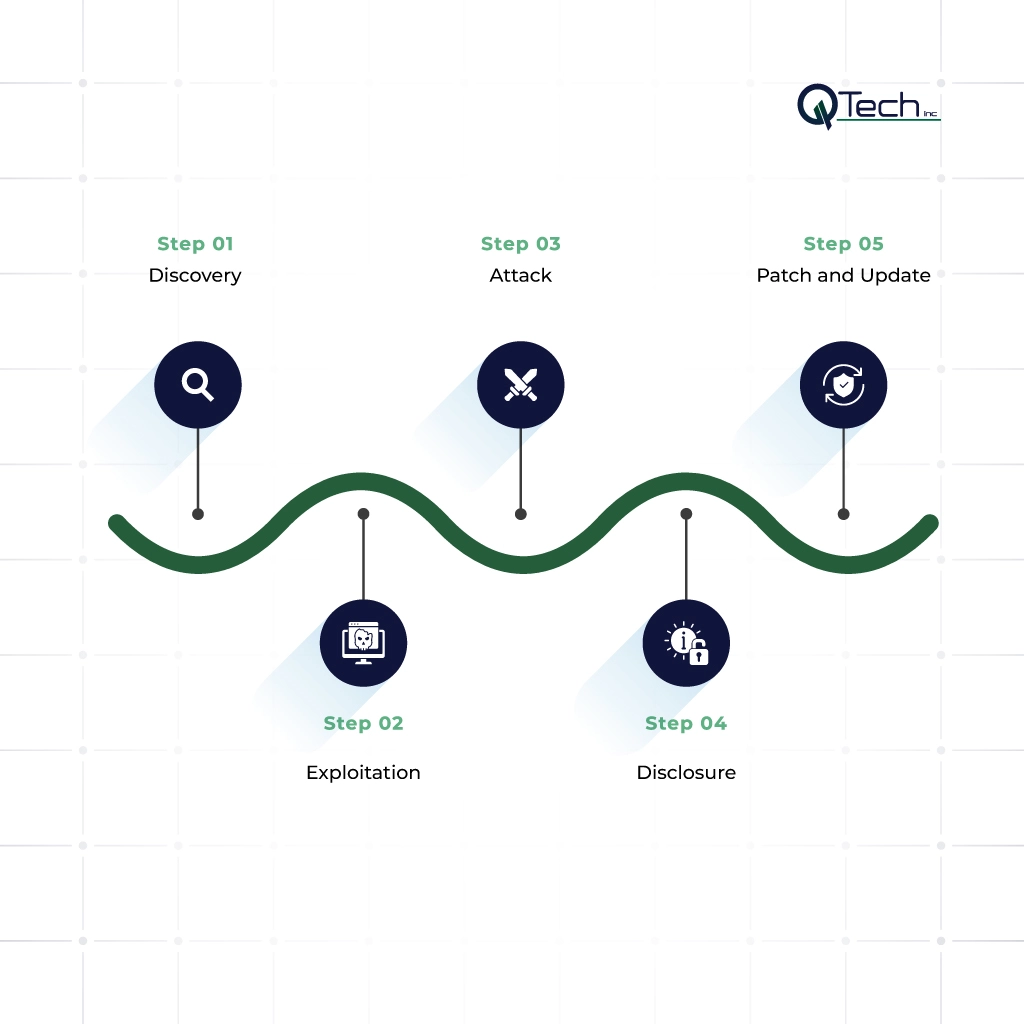
Discovery
Discovery is the moment someone finds the flaw. It could be a trusted researcher, a vendor, a criminal group, or a nation-state team. If the person reports the issue in good faith, the vendor can work on a fix. If a malicious actor finds it first, the flaw may be hidden, sold, or used quietly.
Exploitation
Exploitation happens when the attacker learns how to use the flaw. This may involve a bad file, a fake link, a harmful website, or a command sent to an exposed service.
Artificial intelligence and machine learning can help defenders spot strange behavior. Attackers also use automation to test targets faster. This is why speed and visibility matter.
Attack
The attack phase is where business damage begins. The attacker may steal passwords, enter email accounts, disable tools, copy files, or prepare ransomware. One device can become the first step into many systems. A small opening can become a large event if access controls are weak.
Disclosure
Disclosure happens when the vendor, customers, researchers, or the public learn about the flaw. Sometimes this process is planned and responsible. Other times, the first warning is an active attack. Once the flaw is known, more attackers may try to copy it.
Patch and Update
After disclosure, the vendor works on a fix. A security patch may repair the weak code. A security update may change how the system works.
It may also disable a risky feature. Businesses then need to test and install the fix quickly. This is where good IT services, asset lists, and change control make a clear difference.
Industries Most Targeted by Zero-Day Attacks
Any business can be hit by a zero-day. Some industries face more risk because their data is valuable, their work is time-sensitive, or their systems are hard to stop.
Healthcare
Healthcare groups manage patient records, billing data, insurance details, clinical systems, and connected devices. Downtime can affect care, not just office work. Many medical practices also use special software that cannot always be patched right away. That makes monitoring, backups, and planning essential.
Financial Services
Financial firms hold payment data, account records, identity details, and transaction systems. A zero-day attack can lead to fraud, data theft, or blocked access to key platforms. Trust is central in finance. Even a contained incident can hurt a firm’s name and client confidence.
Legal and Professional Services
Law firms, accounting firms, consultants, and other professional firms store contracts, tax records, client files, and private business plans. Attackers may see them as a path into larger clients. Protecting against zero-day threats is vital when confidential data is part of daily work.
Why Traditional Security Tools Miss Zero-Day Attacks
Traditional tools still matter. The problem is that a zero-day is new by nature. Many defenses are built to stop threats they already know. A strong program uses several layers, not one tool.
Why Antivirus Alone Is Not Enough
Basic antivirus often looks for known files, known patterns, and known bad behavior. A new exploit may not match those records. Modern endpoint tools use behavior checks, machine learning, unsupervised learning, and real-time data to spot activity that feels wrong, even if the file is new. This is why basic antivirus should not be the only defense.
Why Firewalls Don’t Catch What They Don’t Recognize
Firewalls control traffic based on rules, ports, apps, and patterns. They are important, but they may not catch a new exploit hidden inside normal traffic. Strong firewall monitoring and management add review, tuning, alerts, and response. It turns a firewall from a static device into part of an active defense plan.
The Detection Gap: How Long Zero-Days Go Undetected
A zero-day can stay hidden for days, weeks, or months. The length depends on the attacker, the target, and the quality of monitoring. The danger is the detection gap. That is the time between the first compromise and the moment the business finds it. During that gap, attackers may steal login details, map systems, or create hidden access.
Zero-Day Attack Prevention: How Businesses Can Prepare
No company can prevent every zero-day. Still, smart planning can lower the risk and limit damage. Effective zero-day attack prevention is about layers, speed, and clear ownership.
1. Endpoint Detection and Response (EDR)
EDR watches laptops, desktops, and servers for signs of trouble. It can detect strange process activity, privilege changes, script abuse, and unsafe file behavior. If a device looks compromised, EDR can isolate it. That gives the team time to investigate before the attack spreads.
2. Network Behavior Monitoring
Network behavior monitoring looks for unusual traffic. It may find odd data movement, unknown connections, or traffic leaving at strange times. This matters because the first exploit may be new, but the attacker’s behavior often leaves clues.
3. Zero Trust Architecture
Zero Trust means no user, device, or app gets automatic trust. Access must be checked again and again. The business should use multi-factor authentication, least-privilege access, device checks, and identity rules. These steps help protect against zero-day attacks by limiting what an attacker can reach.
4. Patch Management and Vulnerability Scanning
A true zero-day may not have a patch at first. Even so, patch management is still critical. Attackers often combine a new flaw with old, unpatched issues.
Vulnerability scanning helps find exposed systems, outdated software, and weak settings. Once a fix is ready, fast patching helps prevent zero-day damage from growing.
5. Threat Intelligence Feeds
Threat intelligence gives security teams insight into active attacks, risky systems, attacker tools, and signs of compromise. Good threat intelligence helps teams focus on what matters first. It also helps leaders decide how urgent a vendor alert really is.
6. Employee Security Awareness Training
People are often the first to see something strange. Training helps staff spot fake login pages, unusual files, odd requests, and suspicious links. Security awareness does not make every employee an expert. It does make the whole company harder to fool.
7. Incident Response Planning
An incident response plan explains who acts, what to check, who to call, and how to keep the business running. It should include roles, vendor contacts, legal steps, backup checks, and communication rules. Businesses looking for zero-day attack prevention should treat response planning as prevention. A prepared team wastes less time when pressure is high.
Zero-Day Attack Response: What to Do When You’ve Been Hit
When a zero-day attack is suspected, panic helps no one. The goal is controlled action. Move quickly, but protect evidence. Clear steps can stop one affected system from turning into a larger crisis.
Immediate Containment Steps
Start by isolating affected devices or network areas. Disable compromised accounts. Revoke risky sessions. Block suspicious domains and addresses. Preserve logs before making major changes.
Leadership should activate the response plan and assign authority. Messages to staff, clients, or partners should be based on confirmed facts.
Forensic Investigation and Root Cause Analysis
Forensics explains what happened. The team should learn how the attacker entered, what systems were touched, and whether data was viewed or copied. Root cause analysis looks for the weakness that allowed the event to happen. This may include log review, endpoint analysis, account audits, malware review, and vendor support.
Recovery and Business Continuity
Recovery should be careful. Restore clean systems. Apply patches or mitigations. Reset passwords. Validate backups. Watch for signs of return.
Business continuity planning helps the company keep serving clients while systems are restored. After the event, leaders should review lessons learned and close the gaps.
Conclusion & How Q-Tech Inc. Protects Businesses From Zero-Day Threats
A zero-day attack is dangerous because it arrives before the easy answers exist. There may be no patch, no known signature, and no warning that matches a common pattern. Still, businesses are not powerless. With EDR, monitoring, Zero Trust, patch control, threat intelligence, training, and response planning, companies can become much harder to compromise.
Q-Tech Inc. helps businesses prepare for known threats and unknown ones. Through managed IT services, zero-day attack cybersecurity support, firewall monitoring, patch management, endpoint protection, and response planning, we build practical protection around daily operations. The goal is more than stopping an attack. The goal is to protect trust, support growth, and give every business a stronger digital foundation.
FAQ
Q: What is a zero-day attack?
A: A zero-day attack is a cyberattack that exploits a software vulnerability before the software developer releases a security patch. Because there is no available fix on “day zero,” attackers can compromise systems before organizations have time to defend themselves.
Q: What is the difference between a zero-day vulnerability and a zero-day exploit?
A: A zero-day vulnerability is the software flaw itself – a weakness unknown to the vendor. A zero-day exploit is the code or technique used to take advantage of that vulnerability in an attack. The exploit is the weapon; the vulnerability is the weakness.
Q: What industries are most affected by zero-day attacks?
A: Industries frequently targeted include healthcare, finance, government, education, manufacturing, retail, and technology because they manage valuable data and critical infrastructure.
Q: How will AI change zero-day threats in 2026?
A: AI is accelerating both sides of the coin. Attackers use it to discover and weaponize flaws faster, while defenders use it for predictive threat intelligence to spot patterns of anomalous behavior that signal an exploit in progress.
Q: How does Q-Tech Inc. help businesses defend against zero-day threats?
A: Q-Tech Inc. provides managed cybersecurity services, endpoint protection, continuous threat monitoring, vulnerability assessments, cloud security, and incident response solutions to help businesses minimize the risk of zero-day attacks.